Comparison
Vidonto vs OpusClip
OpusClip cuts long videos into social clips; Vidonto edits recordings by text, suggests clips and makes summary videos, with pay-as-you-go credits.
Updated
Checked on . Everything said here about OpusClip comes from OpusClip's own public pages on that date, listed under Sources. Products change, so check their site for the latest. Everything about Vidonto was checked against the app.
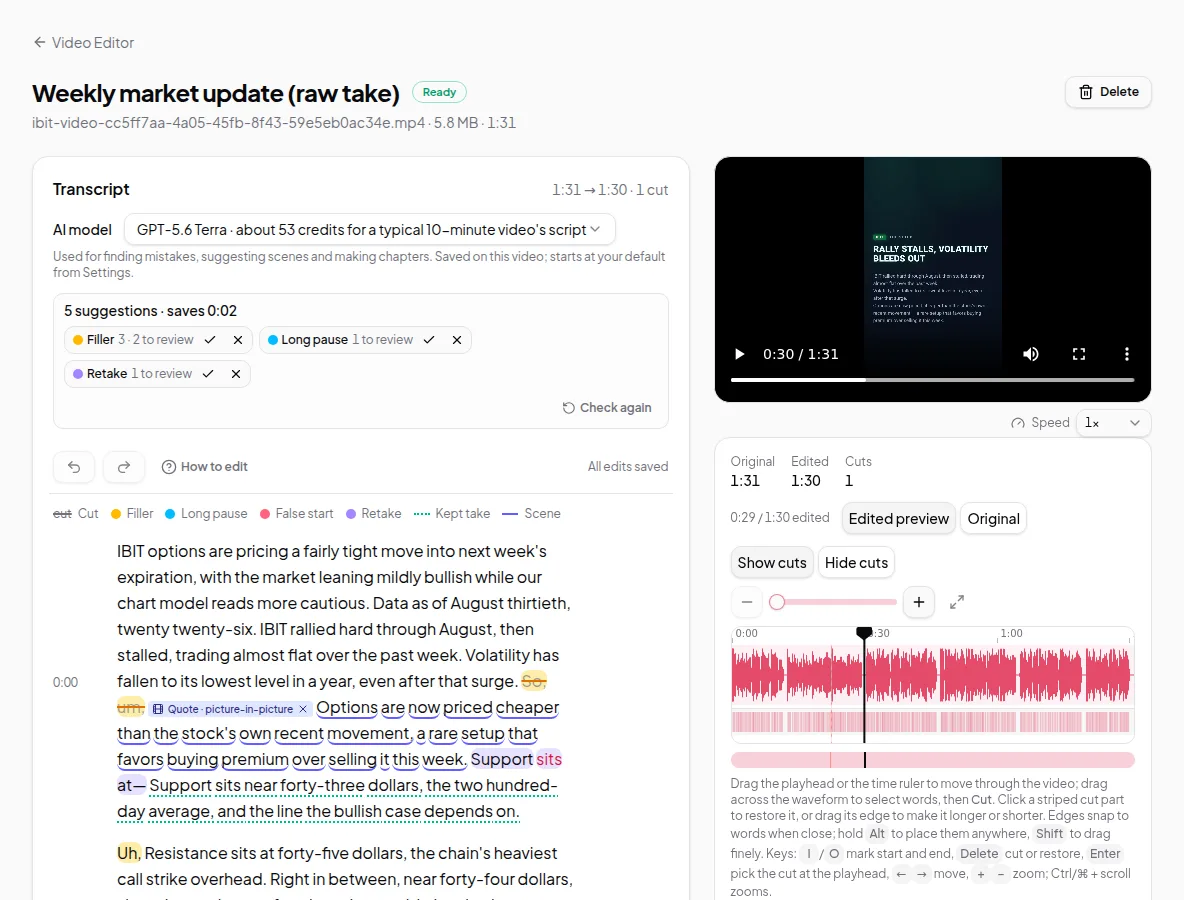
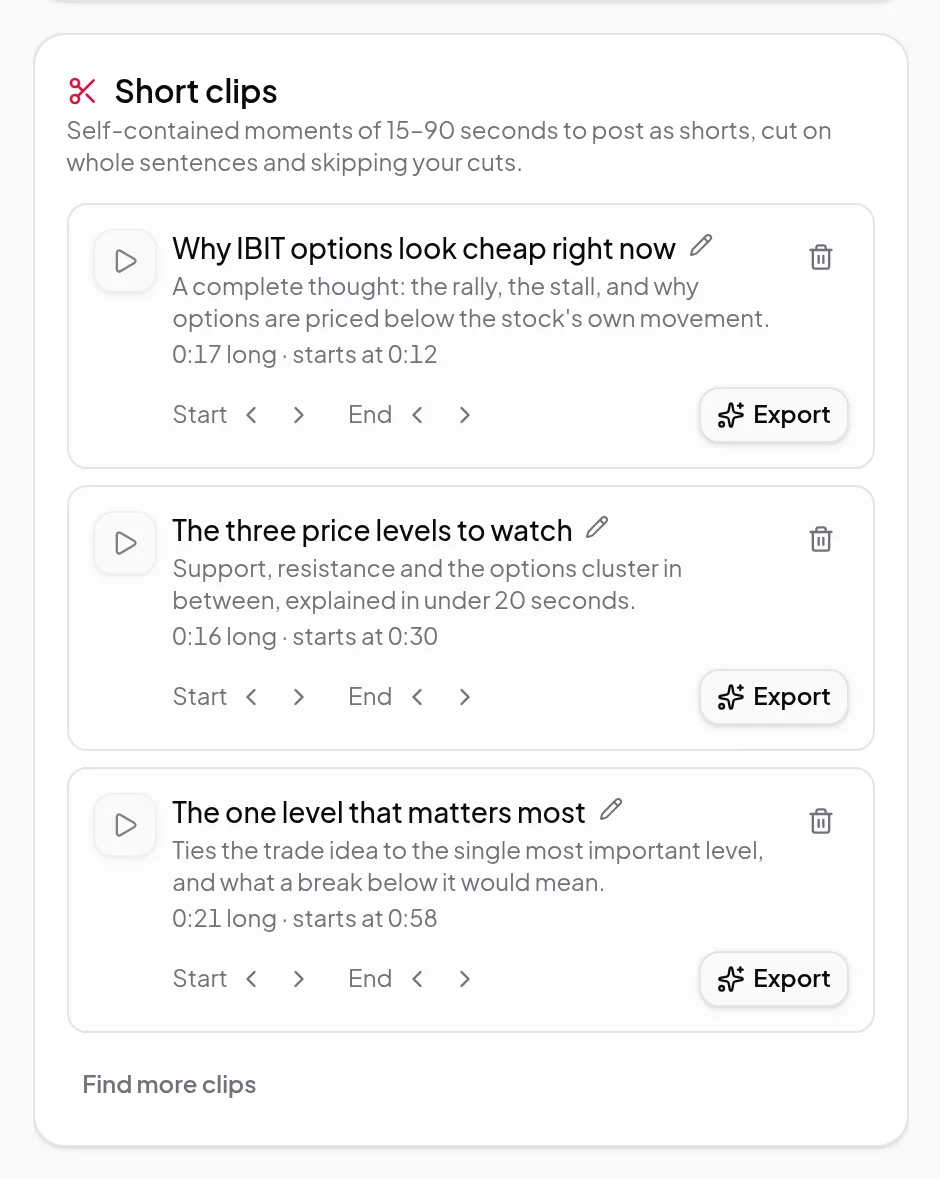
OpusClip and Vidonto both turn a long video into short vertical videos with captions. Vidonto also takes care of the recording the clips come from: record your screen and camera in the browser, clean up the whole take by its transcript with suggested cuts for ums, long pauses and retakes, then pick from a handful of suggested clips, optionally telling it what they should be about. It can also summarize a long YouTube video, an article or a document into one short narrated video instead of cutting clips from it, and you pay with credits as you use them instead of a monthly plan. OpusClip is built around clipping at scale: an AI clipping model for any kind of video, reframing, virality scores, brand templates and a social scheduler.
The short verdict
- Pick OpusClip if you post lots of clips every week from podcasts, streams, sports or vlogs, and want them scored, reframed, branded and scheduled to social accounts for you.
- Pick Vidonto if your long videos are your own talking or screen recordings, you want to clean up the whole recording before any clip is made, or you want a short narrated summary of a YouTube video rather than excerpts from it — and you’d rather pay as you go than keep a monthly plan.
Pay only for what you use
Vidonto has no subscription, no monthly plan and no per-person fee. You buy credits when you need them:
- Packs start at $5 for 1,000 credits. Larger packs include extra credits: 2,100 credits for $10 or 5,500 for $25.
- Purchased credits don’t expire, so there’s no monthly allowance to use up.
- No monthly processing minutes. OpusClip’s plans are measured in credits for the minutes of video you process. In Vidonto your recording stays on your computer, only the sound is sent to make the transcript, and that’s charged by its length from credits that don’t expire. The pricing page shows about how many hours of edited recording each pack makes.
- Editing is free. Cutting words, accepting suggestions, recording and exporting the full recording on your computer never use credits. There’s no watermark.
- You see the price first. Finding clips and each clip export show an estimate in credits before they start.
- Failed steps aren’t charged. Credits are held when a run starts, each step is charged only when it succeeds, and anything unused goes back to your balance.
With no monthly fee, you don’t pay in months you don’t make videos. The only ongoing costs are ones you choose: a video you keep in Vidonto’s cloud, and views of a share link. If you post clips every day, a plan like OpusClip’s may suit you; if you make videos now and then, credits mean you pay only for those. See how pricing differs and the pricing page.
What Vidonto adds that OpusClip’s pages don’t describe
- A recorder in the browser. Record your screen and camera with a camera bubble, then edit the take by its transcript in the same app.
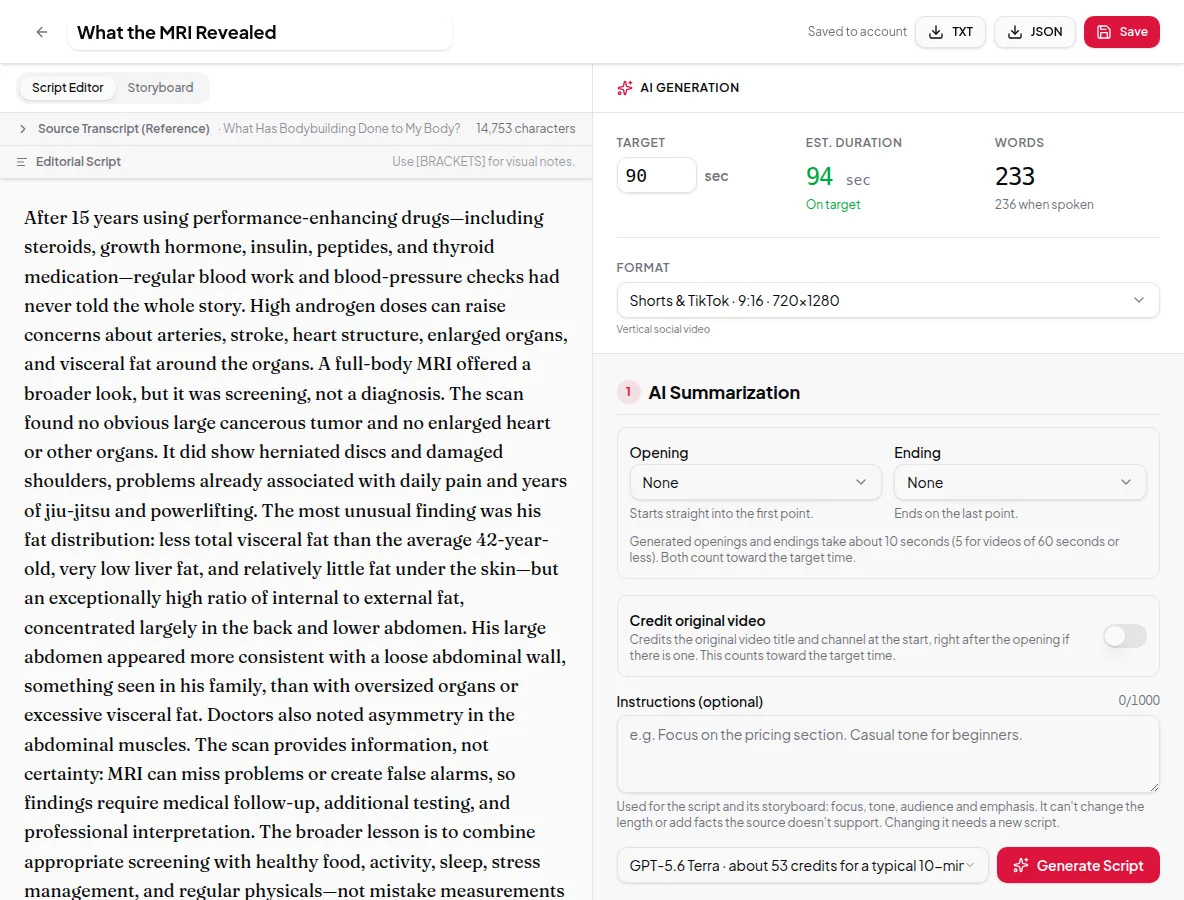
- Summary videos. Turn a YouTube video, a web page, a PDF, Word file or slide deck, or your own script into a narrated video with a storyboard of frames, in one of 26 languages.
- Background effects. Blur or replace the background behind you in exported videos.
- Chapters and longer write-ups. Chapters for the full video, and a description writer that also writes a blog post or how-to article from the words your edit keeps.
Feature by feature
| Vidonto | OpusClip | |
|---|---|---|
| AI picks short clips from a long video | Up to 8 clips of 15–90 seconds, from your own recording | Yes, for any genre of video |
| Prompt for a specific moment | Yes: an optional “What should the clips be about?” box, such as “the part about pricing” | Yes |
| Your own footage in generated videos | Clips from up to 5 of your recordings kept in the cloud, placed in summary videos where they match the narration | Agent Opus makes videos from ideas, scripts, images, audio or video you give it |
| Add a video from a YouTube or TikTok link | Your own YouTube, TikTok, X or Facebook videos, or a direct file link; not Instagram or Vimeo | YouTube, Vimeo and other video links |
| Compilation or highlight videos | Highlights videos: AI-picked sound bites from one recording, linked by narrated bridges or text cards. Compilations: AI-suggested moments from 2 to 10 recordings. You review both before rendering | An AI compilation video maker in Agent Opus |
| Virality score | Not offered; each clip shows why it was picked | Yes, on paid plans |
| Reframe for vertical | Camera views and zooms for screen + camera takes | Yes, AI reframe that follows moving subjects |
| Animated captions | Captions that highlight the spoken word | Yes, with caption templates |
| Remove pauses, filler words and bad takes | Suggested for you to accept or reject | Yes, on paid plans |
| Edit the full recording by its transcript | Yes | Text and timeline editing on paid plans |
| B-roll | AI images, charts, animated scenes and clips from your own recordings in summary videos | AI image, stock and AI video B-roll |
| Dubbing | 29 languages, in a voice like yours | Yes, on paid plans |
| Brand template | Up to 20 brands, each with a logo, colours and fonts from Vidonto’s set, for clips, polished videos and summary videos | Font, colours, logo, intro and outro; more templates on higher plans |
| Schedule and post to social accounts | Not offered; you download the MP4 | Yes |
| Share a link | A watch page with a view count; views use credits | Shareable links to projects |
| Export to Premiere Pro or DaVinci Resolve | Not offered | Yes, on paid plans |
| Record screen and camera | Yes, in the browser | Not described on the pages we checked |
| Clean up noisy sound | Yes, with a strength slider | Speech enhancement, on paid plans |
| Background blur or replace | Yes, in cloud renders and polished videos | Not described on the pages we checked |
| Chapters and a video description | Chapters, a description and a blog post or article for the full video | Clip titles, descriptions and hashtags |
| Summary video from a YouTube link, web page, document or your own script | Yes, in 26 languages | Not described on the pages we checked |
| API | Yes, for summary videos, with batches of up to 100 links and signed webhooks | Yes, for clipping and posting |
| Use from an AI assistant | Claude, ChatGPT and other assistants, through a connector | An MCP connector, on higher plans |
| Pricing model | Pay-as-you-go credits from $5, no subscription; purchased credits don’t expire | Free plan and monthly or yearly credit plans |
Where Vidonto fits better
- Clips from a recording you’ve already cleaned up. Short clips works from your edited recording, so the cuts you made by deleting words and the ums and retakes you removed stay out of every clip. Each clip is a run of whole sentences that makes sense on its own.
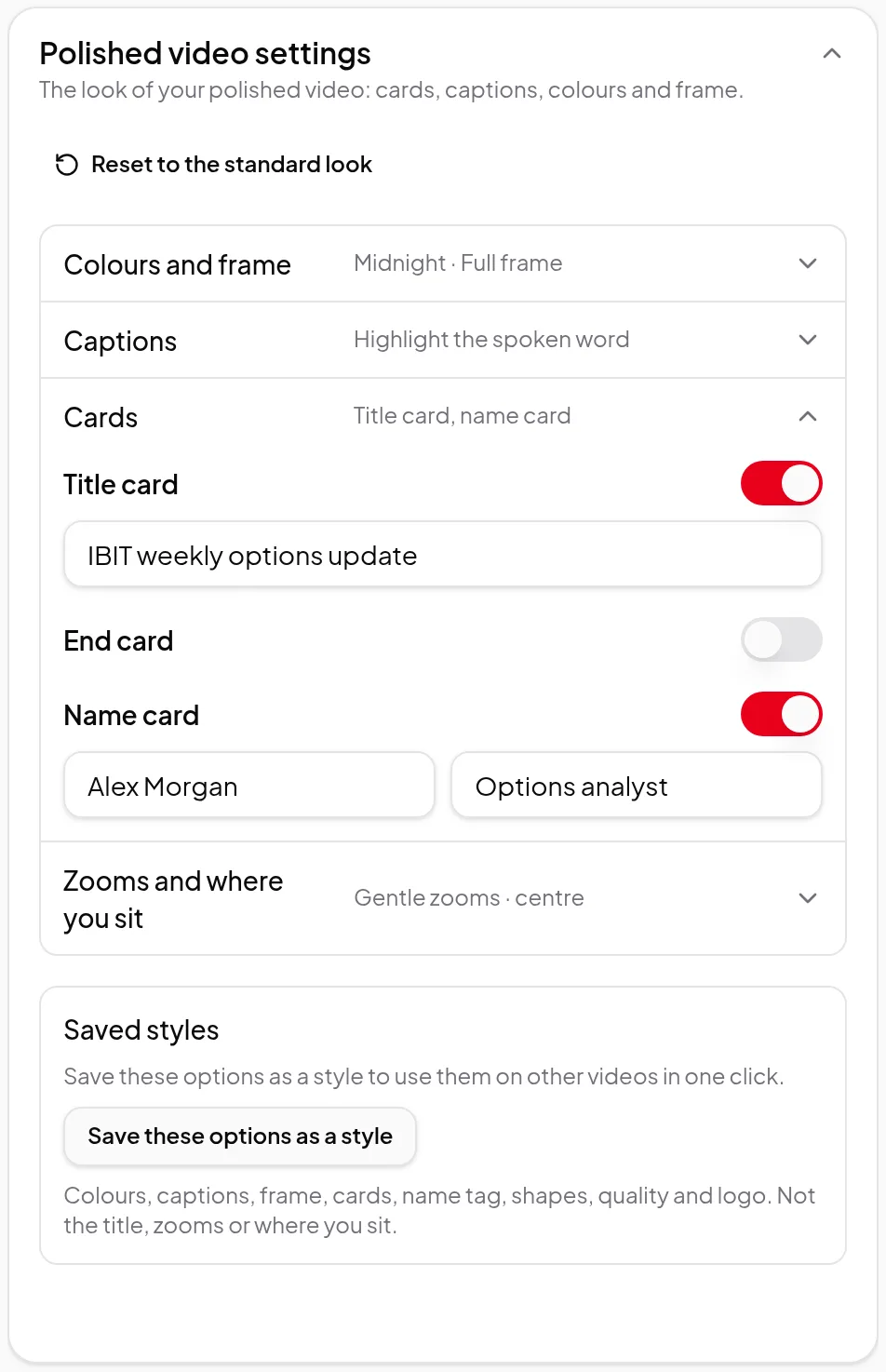
- Screen recordings. For a screen + camera take made in Vidonto, a vertical clip can show the screen with your camera in a bubble, side by side or full screen, and zoom in on the part of the screen you’re talking about.
- A summary instead of excerpts. Clips cut out the best moments; a YouTube summary video retells the whole video in a minute or two, with new narration, captions and on-screen frames. You can also start from an article or your own script.
- One clean main video. The same edit makes a landscape polished video for YouTube, chapters, a video description and dubbed versions — not just clips.
- No subscription. You pay credits only for steps that succeed, and credits you buy don’t expire. Each clip export shows its price first.
- Videos from code or a chat. The developer API and the connector for Claude, ChatGPT and other assistants start summary videos from links, text or your own script.
- More from your own recordings. Summary videos can show clips from your own recordings, you can add your videos from a YouTube, TikTok, X or Facebook link, a highlights video links the best moments of one recording with narrated bridges or text cards, and a compilation turns 2 to 10 recordings into one highlight video. OpusClip’s pages describe link imports and an AI compilation maker too, and OpusClip takes Vimeo links, which Vidonto doesn’t.
Where OpusClip fits better
- Volume. OpusClip is made to pull many clips from long videos of any kind — podcasts, interviews, vlogs, gaming, sports — and Vidonto suggests up to 8 clips per recording and needs speech to work from.
- Video you didn’t record in Vidonto. OpusClip’s AI reframe keeps moving subjects centred in any video. Vidonto’s camera views need a screen + camera take recorded in Vidonto; other recordings are placed inside the vertical frame, and you can add zoom boxes by hand.
- Choosing what to post. OpusClip gives each clip a virality score. Vidonto shows a short reason for each suggestion, with no score.
- Publishing. OpusClip has a social media scheduler, a scheduler API and team workspaces. Vidonto doesn’t post for you and has no shared team workspaces; its share links give viewers a watch page instead.
- Branding and editing hand-off. OpusClip’s brand templates include fonts and intros and outros, and paid plans export to Premiere Pro and DaVinci Resolve. Vidonto’s brands use your logo, colours and fonts picked from its own set, with title and end cards rather than intro and outro clips, and it exports MP4 files.
How pricing differs
OpusClip has a free plan with a limited amount of processing each month and a watermark on exports, a free trial of a paid plan, and paid plans billed monthly or yearly. Plans are measured in credits for the minutes of video you process, and higher plans add features such as the scheduler, B-roll and team workspaces.
Vidonto has no plans. New accounts get starter credits once their email address is verified, and after that you buy credit packs. In the Video Editor, the transcript, finding clips and each clip export use credits; editing and exporting the full recording on your computer don’t. See credits explained.
Try the Vidonto workflow
Sources
OpusClip's public pages, read on October 31, 2026:
- www.opus.pro/
- www.opus.pro/pricing
- www.opus.pro/api
- www.opus.pro/tools/video-to-text
- help.opus.pro/agent-opus/article/ao-faq
- www.opus.pro/agent/workflows/ai-compilation-video-maker
OpusClip is a trademark of its owner. Vidonto isn't affiliated with or endorsed by OpusClip.